
The installed harness
kcap setup installs capture integrations, MCP tools, skills, session-start context, and a global git hook for your coding agents. This page describes the v1.2.1 install so you can inspect what changed on your machine and turn individual parts off.
The examples use Claude Code. The other eight supported agents use the files listed below. Custom agent config directories are respected; see Setup CLI.
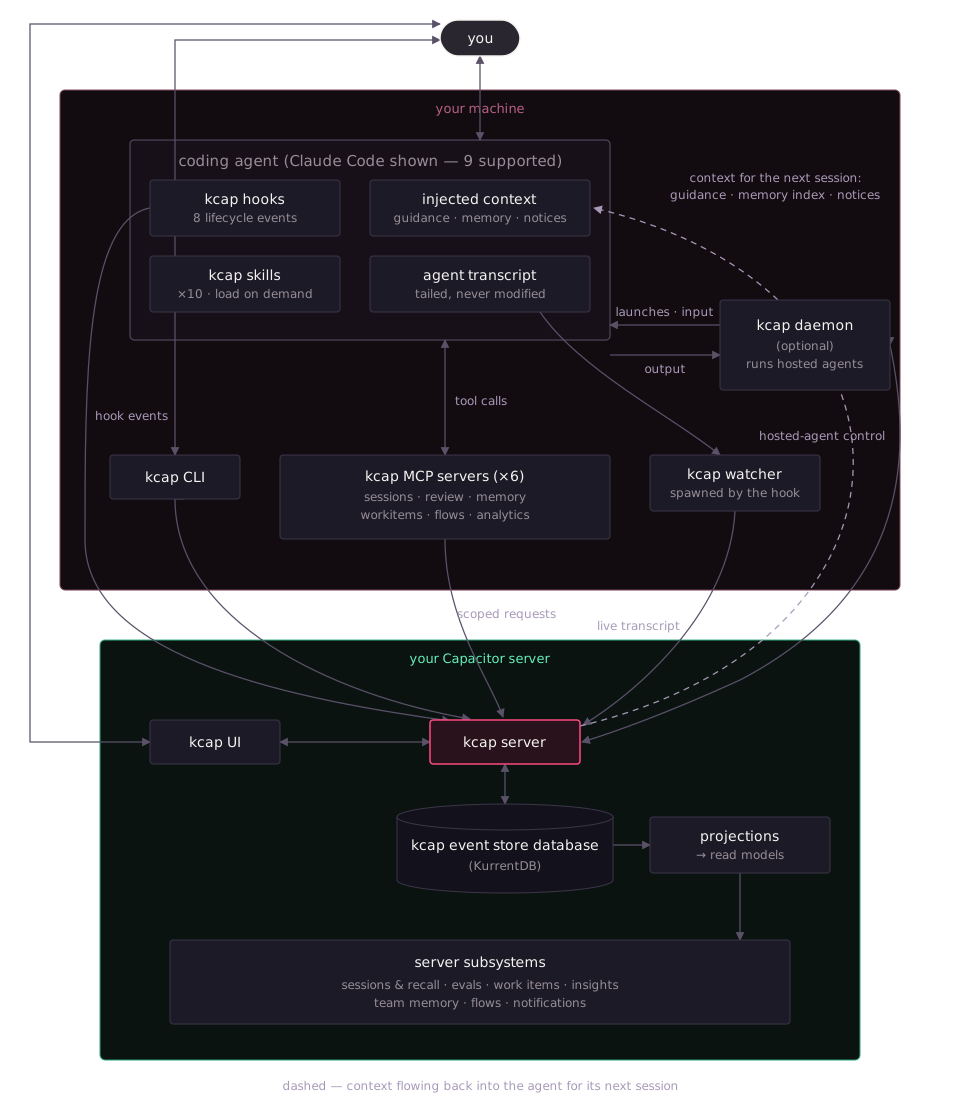
The dashed edge is the one no other diagram shows: context flowing back into the agent. That loop is the point — what sessions produce (mined guidance, the team memory agents saved, live coordination state) flows back in at the next session start.
What kcap setup installs
Section titled “What kcap setup installs”Setup asks one consent question per machine — “Install kcap for these agents (hooks, skills, instructions, MCP)?” — or, when you use the browser first-run flow, records a per-agent answer with two independent axes: Record (capture) and Tools (MCP). The tables below list the integration files. Uninstall removes kcap-owned entries while preserving unrelated agent configuration.
For Claude Code, the entire integration is one plugin registration:
| Artifact | Path | What it does |
|---|---|---|
| Plugin registration | ~/.claude/settings.json — extraKnownMarketplaces.kcap + enabledPlugins["kcap@kcap"] | Points Claude Code at the plugin directory inside the npm package. Everything else Claude-side comes from the plugin bundle. |
| Version marker | ~/.claude/.kcap-plugin-version | Lets kcap status and upgrades detect what is installed. |
| Hooks | plugin bundle hooks/hooks.json | Eleven event types — the full list is below. Capture and tool-policy events use kcap hook --claude; the prompt event runs the title script. |
| MCP servers | plugin bundle .mcp.json | Eight servers, detailed below. The installer configures the command used to start each server. |
| Skills | plugin bundle skills/ | Twelve skills, surfaced to the agent as kcap:<name> — list below. |
| Session-id script | plugin hooks/persist-session-id.sh (SessionStart) | Exports KCAP_SESSION_ID into the agent’s shell environment so terminal commands in the session can name it. |
| Title script | plugin hooks/set-title-prompt.sh (UserPromptSubmit) | Once per session, asks the agent to run kcap set-title so the dashboard shows a human title. |
kcap does not edit CLAUDE.md or any other instructions file for Claude Code. (Five other agents get a marker-delimited steering block — see the differences table.)
Off to the side of any one agent, setup also writes the CLI’s own state:
| Artifact | Path | What it does |
|---|---|---|
| Profile | ~/.config/kcap/config.json | Server URL, default session visibility, daemon name, feature toggles. |
| Tokens | ~/.config/kcap/tokens/ | Your login token, shared by the CLI, hooks, watcher, and daemon. |
| Watcher state | ~/.config/kcap/watchers/ | Pid, heartbeat, and marker files for live-session watchers. |
The git hook
Section titled “The git hook”When setup or kcap plugin install installs any agent’s hooks, it also adds one entry to your global git config (~/.gitconfig): a config-based hook named kcap on post-commit and post-merge. Config-based hooks need git 2.54 or later; an older git ignores the entry.
After each commit or merge, git runs kcap git-hook. It contacts no server, prints nothing, and always exits 0. It finds the coding agent process above the commit and files the commit — SHA, repository, branch, and message, with secrets redacted — under that agent’s session. The watcher sends it with the transcript. Because git itself places the commit, one made from a subfolder, a nested repository, or a script lands in the right repository and pull request, and a quiet (-q) commit is not missed.
| Agent | How commits are found |
|---|---|
| Claude Code, Codex, Copilot CLI, Kiro, Pi | The git hook, when it is installed and enabled. |
| Cursor, OpenCode, Antigravity | Read from the agent’s shell commands. One of their processes can host several sessions, so a commit cannot be tied to one of them. |
Without the hook — an older git, the hook turned off, or kcap not yet set up again after an update — commits are read from the agent’s shell commands as before. The hook runs beside hooks you already have (core.hooksPath, husky, pre-commit) and does not replace them.
git hook list post-commit # shows kcap when it is installedgit config --global hook.kcap.enabled false # turn it offUpdating kcap does not add the hook; it only repoints an existing entry at the new binary. Run kcap setup or kcap plugin install once to add it. kcap uninstall removes it.
The eight MCP servers
Section titled “The eight MCP servers”All eight run locally as kcap mcp <name> and translate the agent’s tool calls into authenticated requests against your kcap server — reads are filtered by your session-visibility permissions, and writes act as you. The tool inventory follows the installed CLI version.
| Server | Tools | Writes? | Plan |
|---|---|---|---|
kcap-sessions | search_sessions, list_repo_sessions, list_repo_plans, get_declared_plans, get_session_summary, get_session_transcript, list_turns, get_turn | read-only | all plans |
kcap-review | get_pr_summary, list_pr_files, get_file_context, search_context, list_sessions, get_transcript | read-only | all plans |
kcap-memory | search_memories, get_memory, save_memory, update_memory, rescope_memory, archive_memory | writes memories | all plans |
kcap-workitems | declare_work_item, get_session_work_items, declare_work_breakdown, retract_work_breakdown, declare_work_relation, retract_work_relation, get_work_item_topology, merge_work_item, detach_work_item, declare_loose_end | writes work-item state | Team+ |
kcap-flows | start_review_flow, submit_review_round, get_review_flow_status, close_review_flow, start_flow, send_to_participant, get_flow_status, close_flow, list_flow_definitions, list_reviewer_vendors | launches agents — never auto-approved | all plans (runs on your own daemon) |
kcap-plans | declare_plan_document, set_plan_tasks, update_plan_task, get_plan | writes plan documents and tasks | all plans |
kcap-artefacts | publish_artefact, await_artefact_responses, get_artefact_results, close_artefact_responses, list_my_artefacts, set_artefact_visibility | publishes pages — never auto-approved | all plans |
kcap-analytics | get_analytics_schema, query_analytics | read-only | Team+ |
kcap-artefacts publishes self-contained HTML pages; see Artefacts.
Every kcap tool advertises MCP annotations (read-only, destructive, idempotent), so a harness that decides approval from them — Codex, for one — runs reads and additive writes without asking and prompts before a tool that removes or overwrites something. Where a harness has a per-server trust setting, registration also pre-approves the servers that only read or write to the session’s own record: Codex (default_tools_approval_mode = "approve") and Gemini CLI ("trust": true) pre-approve kcap-sessions, kcap-review, kcap-analytics, kcap-workitems, and kcap-plans. kcap-flows, kcap-memory (a save can widen who sees a memory), and kcap-artefacts (can widen who may open a page) keep prompting. Re-running kcap setup updates a Codex entry an earlier kcap wrote; an entry you edited is left alone. The Codex kcap-flows entry also sets tool_timeout_sec = 600 so Codex’s own timeout does not cut a flow call short.
Two more MCP servers exist in the binary but are deliberately not registered into your agents: kcap mcp judge (session-quality tooling, manual use only) and kcap mcp flow-result (injected by the daemon into hosted reviewer agents only — it is how a reviewer returns its verdict, and a normal session never has it).
The twelve skills
Section titled “The twelve skills”Skills are instruction documents your agent can load when the request matches their purpose. They guide tool use inside the session.
| Skill | What it triggers on |
|---|---|
recap | Read, search, or recall past sessions (“what did we do last time?”). |
errors | Extract the tool errors and failures from a recorded session. |
validate-plan | Check every item of the session’s plan was actually completed. |
review-flows | Run a structured review loop with a separate reviewer agent until sign-off. |
agent-flows | Run any named flow definition with a hosted participant agent. |
suggest-review-flow | Offer (never auto-start) an independent second-agent review when work wraps up. |
plans | Record a plan, spec, design document, or task list and keep task progress current. |
work-items | Declare a work item’s breakdown and dependencies (Team+ — calls kcap-workitems). |
guided-tour | A product tour for someone who just installed kcap. |
eval-watch | Follow the history import kcap setup started and summarize the first evals on those sessions (“Follow my kcap import”). |
hide | Set the current session’s visibility to owner-only. |
disable | Stop recording, or delete the current session. |
The session lifecycle
Section titled “The session lifecycle”Session start: what fires, and what gets injected
Section titled “Session start: what fires, and what gets injected”When you start a session, Claude Code fires the SessionStart hook. The hook starts the watcher before posting to the server, then supplies session-start context when available. A temporarily unavailable server does not prevent your agent session from starting.
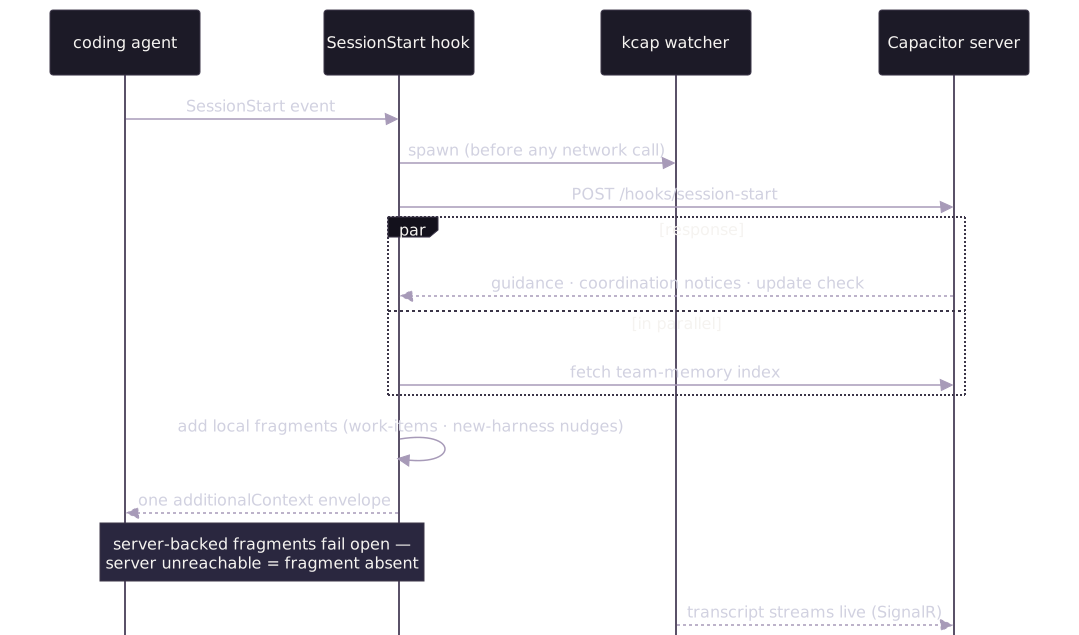
Session-start context can include the fragments below. Each is individually removable via kcap config set (the disable_* keys take true; update_check takes false), and the server-backed fragments fail open — if the server is slow or down, they are simply absent and your session starts normally.
| Injected fragment | Contents | Opt-out key |
|---|---|---|
| Guidance from past sessions | Recurring patterns mined from your team’s previous sessions in this repo — the feedback loop’s output. | disable_session_guidelines |
| Shared memory index | Relevant repository, project, and organization memories, filtered by audience — slugs and one-line descriptions only; the agent reads a body when needed. | disable_memory_index |
| Coordination notices | Warnings when teammates’ live sessions overlap the same files or work. | disable_coordination_notices |
| Work-items nudge | The session id and instructions to link the session to its issue or PR. Requires the MCP registration and is suppressed when the cached tenant plan excludes Work Items. | disable_workitems_nudge |
| Plans nudge | Instructions to declare plan documents and task progress through kcap-plans, when that server is registered. | disable_plans_nudge |
| First-run notice | Once, in the first session that starts after kcap setup installed something: setup completed, the hooks are loaded, and an offer of the guided tour. | disable_first_run_notice |
| New-harness nudge | A one-time offer to set up kcap for a newly detected coding agent (throttled to every 6 h). | disable_harness_nudge |
| CLI-update nudge | A note when your kcap binary is older than what your server recommends. | update_check (set to false) |
Agent-specific output determines how this context appears. Claude can also receive an approval-policy diagnostic when its policy configuration is degraded.
Claude Code registers SessionStart, SessionEnd, SubagentStart, SubagentStop, PreToolUse, PostToolUse, PostToolUseFailure, Notification, Stop, PermissionRequest, and UserPromptSubmit. Tool hooks support local approval policy and tool outcomes. PermissionRequest bridges prompts to the dashboard; a prompt answered in the terminal is retired from the daemon too. UserPromptSubmit runs the title script.
During the session
Section titled “During the session”Three things run concurrently while you work:
- Capture. The watcher tails the agent’s own transcript file and streams it to the server over SignalR — prompts, responses, tool calls and results, thinking blocks, token counts. Subagents get their own watchers via
SubagentStart/SubagentStop. The agent’s transcript file is never modified. - Tools. The agent can call the eight MCP servers above. Everything they return comes from your server, filtered by session visibility — an agent cannot read a session its user could not see in the dashboard.
- Skills. If you (or the agent) invoke one, it runs inside the session like any other instruction document —
recapsearches history throughkcap-sessions,review-flowsstarts a reviewer throughkcap-flows, and so on.
Each commit the agent makes also runs the git hook, which files the commit under the session.

Session end, and what the server does
Section titled “Session end, and what the server does”SessionEnd stamps the end time and posts it; the watcher notices the agent has exited (it watches the parent process) and reaps itself. Two agents without native end events — Kiro and OpenCode — get a synthesized session-end from the watcher instead.
Clearing a Claude Code chat with /clear ends its session and starts a new one. The new session’s start names the session its own terminal cleared, so two Claude terminals in the same repository no longer link to each other’s chats.
Server-side, the session is already durable: every captured event was appended to an immutable per-session stream in KurrentDB as it happened. Projections fold those streams into read models, and the subsystems consume them:

- Sessions & recall — the transcript your team browses, replays, and searches; the same data
kcap-sessionsserves back to agents. - Evaluations — configurable automatic evals judge the session (did the agent loop, waste context, fail tool calls?) and post suggestions.
- Work items (Team+) — a signals extractor parses the transcript for issue keys, PR refs, and commit SHAs; correlation ties sessions to tracker items and drives progress views.
- Insights (Team+) — cost, usage, and outcome analytics across sessions; the same governed query API
kcap-analyticsexposes to agents. - Shared memory — repository, project, and organization memories become searchable in future sessions, subject to their audience.
- Flows — if the session started a review flow, the server orchestrates the reviewer rounds through your daemon until sign-off.
- Notifications — session outcomes and collision detection fan out to the in-app inbox and Slack, per your preferences.
The loop closes
Section titled “The loop closes”The next SessionStart in that repo receives the results: mined guidance from what worked and what failed, the updated memory index, and coordination notices about live teammates. That closed loop — capture → process → re-inject — is the workflow kcap actually ships, and it is why the install is larger than a transcript recorder.
Background processes
Section titled “Background processes”Capture and hosted execution use separate background processes:
- Watcher — follows transcript-based capture sessions and supported subagents; exits when the session ends or its agent process exits. Extension-based agents have their own capture wiring. State lives in
~/.config/kcap/watchers/. - Daemon (optional) —
kcap daemonkeeps your machine reachable from your server to run hosted agents in isolated git worktrees, and review-flow reviewers, whose workspace mode varies — borrowed checkout, snapshot, or context-only (see Review flows). Installed as an OS service only if you opt in (kcap daemon service install— launchd on macOS, systemd user unit on Linux, Scheduled Task on Windows). Every server-initiated launch is checked against a local consent policy you control (kcap daemon consent), and every decision is logged toconsent-decisions.jsonl. No daemon, no remote execution — the capture pipeline works without it.
Everything else is scoped to a session or shorter: the eight kcap mcp stdio servers run as child processes of your agent (one set per session, started and stopped by the agent itself), hook processes and kcap git-hook run for moments, and a detached helper Claude Code’s session-end spawns so final capture work isn’t cut off by the agent’s hook timeout.
Turning things off
Section titled “Turning things off”The harness is layered, and each layer has its own switch:
- Per injection — the opt-out keys in the table above, via
kcap config set(thedisable_*keys taketrue;update_checktakesfalse). - Per piece, per agent — browser setup separates Record and Tools choices. Terminal setup also has agent-specific skip flags; use
kcap setup --helpfor the supported combinations. Claude bundles its integration in a plugin, so flags are not symmetrical across agents. - Commit capture —
git config --global hook.kcap.enabled falseturns the git hook off; commits are then read from the agent’s shell commands. - Per repository or directory — allow lists and exclusions constrain live capture, imports, and unattended hosted launches.
- Per session — the
hideanddisableskills, orkcapCLI equivalents. - Everything —
kcap uninstallenumerates and removes every artifact in the tables above and the git hook (pass--keep-configto preserve~/.config/kcap), stops watchers and daemons, and removes OS service units.
What’s plan-gated
Section titled “What’s plan-gated”The server checks plan entitlements when tools are called. Work Items and Insights require Team or Enterprise, so their MCP servers can be installed on Free while their API calls remain unavailable. The CLI suppresses the work-items reminder once the server has reported that the plan excludes the feature. A machine with no cached entitlement can still show the reminder.
Capture, session recall, shared memory, and flows using your own daemon are available on every plan. See Plans & seats for feature availability and usage limits.
The same harness on other agents
Section titled “The same harness on other agents”All twelve agents have capture integrations, with different hooks and transcript formats; the table shows which also get MCP tools, skills, and steering. Claude Code loads everything from one plugin; the rest get discrete files:
| Agent | Capture mechanism | MCP registration | Skills tree | Steering file |
|---|---|---|---|---|
| Claude Code | plugin hooks (11 event types) | plugin .mcp.json | plugin bundle | — |
| Codex | ~/.codex/hooks.json | ~/.codex/config.toml | ~/.agents/skills/ | — |
| Cursor | ~/.cursor/hooks.json | ~/.cursor/mcp.json | ~/.agents/skills/ | — |
| Copilot CLI | ~/.copilot/hooks/kcap.json | ~/.copilot/mcp-config.json | ~/.agents/skills/ | ~/.copilot/copilot-instructions.md |
| Gemini CLI | ~/.gemini/settings.json hooks block | ~/.gemini/settings.json | ~/.gemini/skills/ | ~/.gemini/GEMINI.md |
| Kiro | cloned agent ~/.kiro/agents/kcap.json, set as default agent | ~/.kiro/settings/mcp.json | ~/.kiro/skills/ | — |
| Pi | TypeScript extension ~/.pi/agent/extensions/kcap.ts | extension bridge (Pi has no native MCP) | ~/.agents/skills/ | ~/.pi/agent/AGENTS.md |
| OpenCode | plugin ~/.config/opencode/plugins/kcap.ts on the event bus | ~/.config/opencode/opencode.json | ~/.agents/skills/ | ~/.config/opencode/AGENTS.md |
| Antigravity | plugin dir ~/.gemini/config/plugins/kcap/ | ~/.gemini/config/mcp_config.json | ~/.gemini/skills/ | ~/.gemini/GEMINI.md (shared) |
| Muse Code | ~/.config/muse/settings.json hooks | ~/.config/muse/settings.json (mcp_servers) | ~/.agents/skills/ | — |
| Grok Build | ~/.grok/hooks/kcap.json | — | ~/.agents/skills/ | — |
| Mistral Vibe | ~/.vibe/hooks.toml | ~/.vibe/config.toml | ~/.agents/skills/ | — |
Worth knowing before you diff:
- Steering blocks are one canonical text between
<!-- BEGIN kcap -->/<!-- END kcap -->markers — five agents carry one, in four files (Gemini CLI and Antigravity share~/.gemini/GEMINI.md). It tells the agent when to prefer kcap’s context tools (PR summary beforegh pr diff, session search beforegit logarchaeology, memory search before assuming no prior art) and to offer — never auto-start — a second-agent review when work completes. - Kiro’s install is the most invasive: kcap clones your default Kiro agent, adds its hook, and sets the clone as the default (the original is recorded and restored on uninstall). Setup says so before you consent.
- Kiro Crew regenerates its agent profiles at every start and reads only
~/.kiro/hooks/*.shas hooks and~/.kiro/crew/skillsas skills. When Crew is present, kcap also writes~/.kiro/hooks/kcap-spawn.shand copies its skills into~/.kiro/crew/skills. See Setup CLI. - Pi and OpenCode have no shell-hook mechanism, so they get small TypeScript extensions instead; the extension source is right there in the path above.
- Session-start context uses each agent’s supported mechanism. Work-item and plan reminders require their MCP tools to be installed, and the configuration opt-outs apply independently.
Where to go next
Section titled “Where to go next”- System architecture — the capture pipeline picture, and why the store is an event store.
- What kcap captures — exactly what data reaches your server, and what never does.
- Setup CLI — install flags, per-agent detection, re-running discovery.
- CLI command reference — every
kcapcommand the harness uses.