
KurrentDB v26.0: Simpler Integrations, Faster Streams, Better Together with Redpanda
Note: For the full release notes, and upgrade guide see here.
Streaming platforms, operational databases, and relational systems all need to work together - without complex integration code, custom pipelines, or months of engineering effort. With KurrentDB v26.0, we’re taking a major step forward in making integrations simpler, faster, and more reliable! This release introduces:
- A new Kafka Source connector
- A new Relational Sink connector for Postgres and SQL Server
- A strategic partnership with Redpanda, delivering direct integration between Redpanda and KurrentDB
- A new way to define user-defined index to quickly query events that meet your specific needs
Together, these enhancements dramatically reduce integration time and complexity, while unlocking powerful new streaming architectures
Kafka Source Connector: Streaming into KurrentDB Made Easy
Event-native architectures typically involve a streaming platform for message transport. These platforms, however, lack the characteristics of an operational database such as durability, immutability, and guaranteed ordering. KurrentDB shines in this area, but until now, ingesting to KurrentDB from Kafka-esque topics often meant writing and maintaining custom consumers, handling offset management, retries, ordering and failure scenarios yourself
With Kurrent v26.0, that changes
Our new Kafka Source connector allows you to stream events directly from Kafka-esque platforms such as Confluent Kafka and Redpanda into KurrentDB using simple configuration; no custom code required
Key benefits:
- Zero custom consumers to build or maintain
- Faster time to production with declarative configuration
- Consistent ingestion semantics aligned with KurrentDB’s event model
- Less operational risk and maintenance burden from homegrown integration code
Configuring a Kafka Source connector is very simple. Here’s an example that creates and starts the connector:
curl -v -i -k \
  -X POST https://localhost:2113/connectors/positions-kafka-source \
  -H "Content-Type: application/json" \
  -u "admin:changeit" \
  -d '{
  "settings": {
    "InstanceTypeName": "kafka-source",
    "topic": "PositionUpdates",
    "consumer:bootstrapServers": "kafka:9092",
    "schemaName": "PositionUpdate",
    "stream:strategy": "fixed",
    "stream:expression": "PositionUpdates-bronze"
  }
}'\

sleep 10

curl -v -i -k -X POST https://localhost:2113/connectors/positions-kafka-source/start -u "admin:changeit"
Once messages are appended as events, organizations can harness the full power of KurrentDB, including our gold standard durability, immutability, and guaranteed ordering, our projection engine for transformations, and our fine-grained streams to keep entities separate:
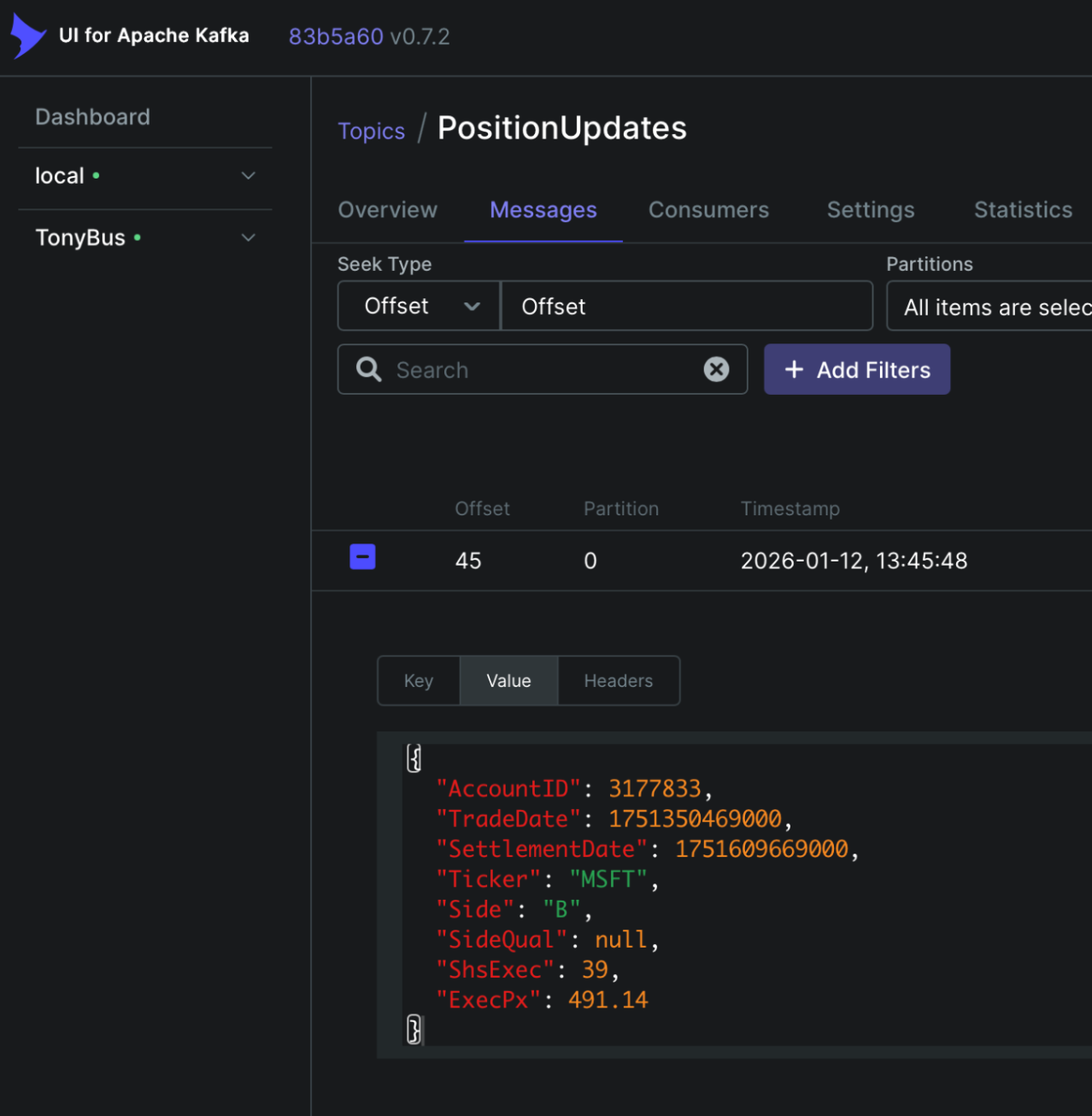
…transforms into…
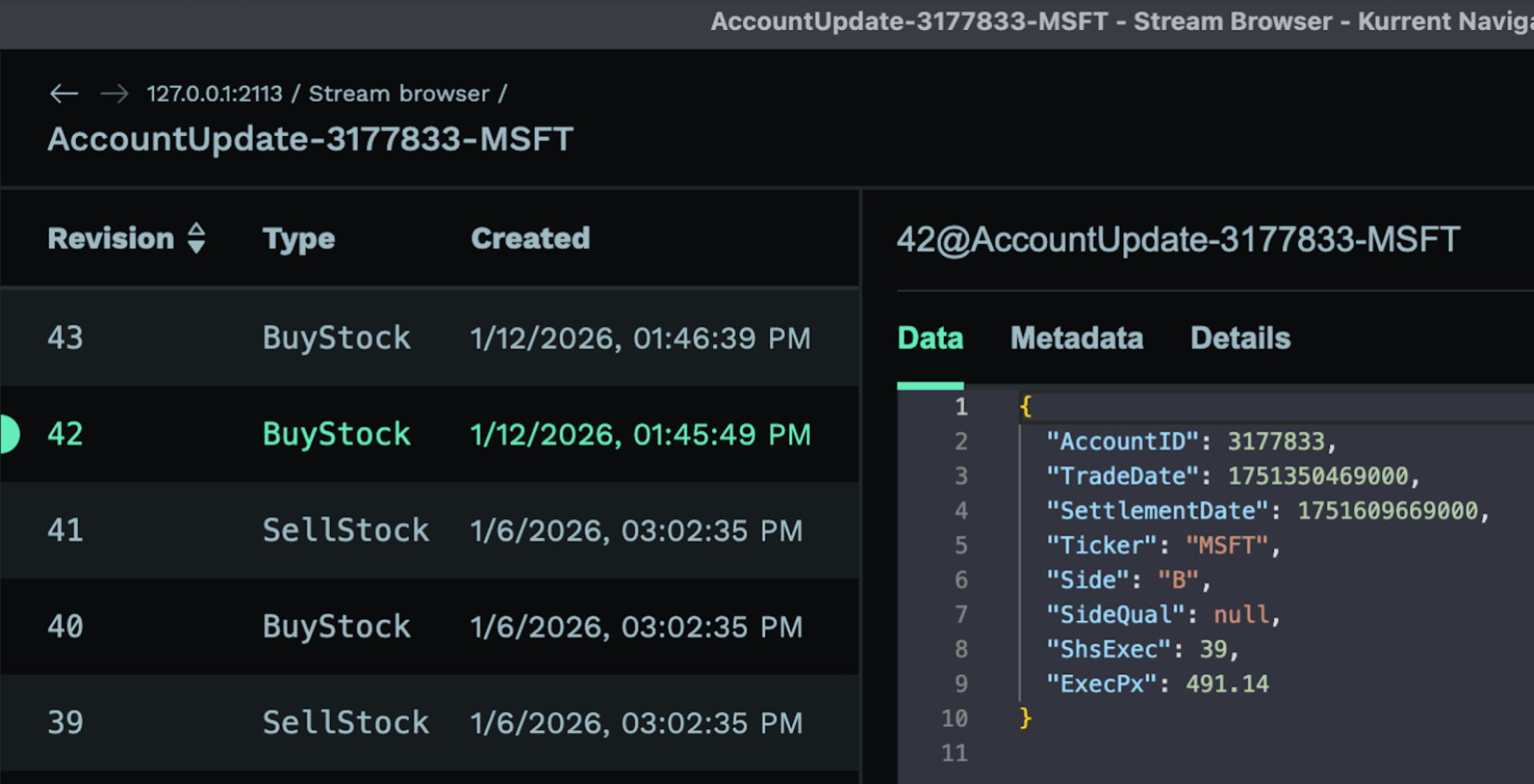
Combined with KurrentDB’s existing Kafka Sink connector, organizations can now take events round-trip from messaging platform, to event-based operational database, to messaging platform with configuration not code. Learn more in our documentation
New Relational Sink Connector: Postgres & SQL Server Without the Plumbing
SQL Read Models are very useful for reporting, analytics, etc.. But projecting event streams into relational models traditionally requires bespoke services or complex ETL jobs
KurrentDB v26.0 introduces a new Relational Sink connector with first-class support for Postgres and SQL Server
With this connector, you can stream events from KurrentDB directly into relational databases - again, using configuration instead of code
Key benefits
- No custom projection services to host, monitor, or maintain
- Reduced integration complexity with fewer moving parts
- Faster iteration on read models when schemas or requirements change
- Cleaner separation between write-side events and read-side schemas simplifying the full potential of CQRS
Configuring a relational sink connector is also very simple. Start by defining a reducer to convert event elements into relational fields. Each event type that is to be processed by the connector should have a block defining an Extractor statement that maps event elements into parameters, and a SQL Statement that is to be executed on the target, mapping parameters to columns :
{
  "BuyStock": {
    "Statement": "INSERT INTO AccountPosition (PositionID, AccountID, TradeDate, SettlementDate, Ticker, Side, SideQual, ShsExec, ExecPx) VALUES (@AccountID || '-' || @Ticker, @AccountID, to_timestamp(@TradeDate/1000), to_timestamp(@SettlementDate/1000), @Ticker, @Side, @SideQual, @ShsExec, @ExecPx)",
    "Extractor": "(record) => ({ AccountID: record.value.AccountID, TradeDate: record.value.TradeDate, SettlementDate: record.value.SettlementDate, Ticker: record.value.Ticker, Side: record.value.Side, SideQual: record.value.SideQual, ShsExec: record.value.ShsExec, ExecPx: record.value.ExecPx })"
  },
  "SellStock": {
    "Statement": "INSERT INTO AccountPosition (PositionID, AccountID, TradeDate, SettlementDate, Ticker, Side, SideQual, ShsExec, ExecPx) VALUES (@AccountID || '-' || @Ticker, @AccountID, to_timestamp(@TradeDate/1000), to_timestamp(@SettlementDate/1000), @Ticker, @Side, @SideQual, @ShsExec, @ExecPx)",
    "Extractor": "(record) => ({ AccountID: record.value.AccountID, TradeDate: record.value.TradeDate, SettlementDate: record.value.SettlementDate, Ticker: record.value.Ticker, Side: record.value.Side, SideQual: record.value.SideQual, ShsExec: record.value.ShsExec, ExecPx: record.value.ExecPx })"
  },
  "StockShortSale": {
    "Statement": "INSERT INTO AccountPosition (PositionID, AccountID, TradeDate, SettlementDate, Ticker, Side, SideQual, ShsExec, ExecPx) VALUES (@AccountID || '-' || @Ticker, @AccountID, to_timestamp(@TradeDate/1000), to_timestamp(@SettlementDate/1000), @Ticker, @Side, @SideQual, @ShsExec, @ExecPx)",
    "Extractor": "(record) => ({ AccountID: record.value.AccountID, TradeDate: record.value.TradeDate, SettlementDate: record.value.SettlementDate, Ticker: record.value.Ticker, Side: record.value.Side, SideQual: record.value.SideQual, ShsExec: record.value.ShsExec, ExecPx: record.value.ExecPx })"
  }
}
Simply Base64 encode the reducer, and pass it in your connector creation script:
curl -v -i -k \
  -X POST https://localhost:2113/connectors/stocks-postgres-account-position \
  -H "Content-Type: application/json" \
  -u "admin:changeit" \
  -d '{
  "settings": {
    "InstanceTypeName": "sql-sink",
    "type": "PostgreSql",
    "reducer:mappings": "ewogICJCdXlTdG9jayI6IHs...kiCiAgfQp9Cg==",
    "connectionString": "Host=postgres;Port=5432;Database=postgres;Username=superset;Password=superset",
    "headers:ignoreSystem": "false",
    "Subscription:Filter:Scope": "Stream",
    "Subscription:Filter:Expression": "AccountUpdate-.*?",
    "subscription:initialPosition": "earliest"
  }
}'

sleep 10

curl -v -i -k -X POST https://localhost:2113/connectors/stocks-postgres-account-position/start -u "admin:changeit"
And voila; a multi-purpose SQL read model is born!
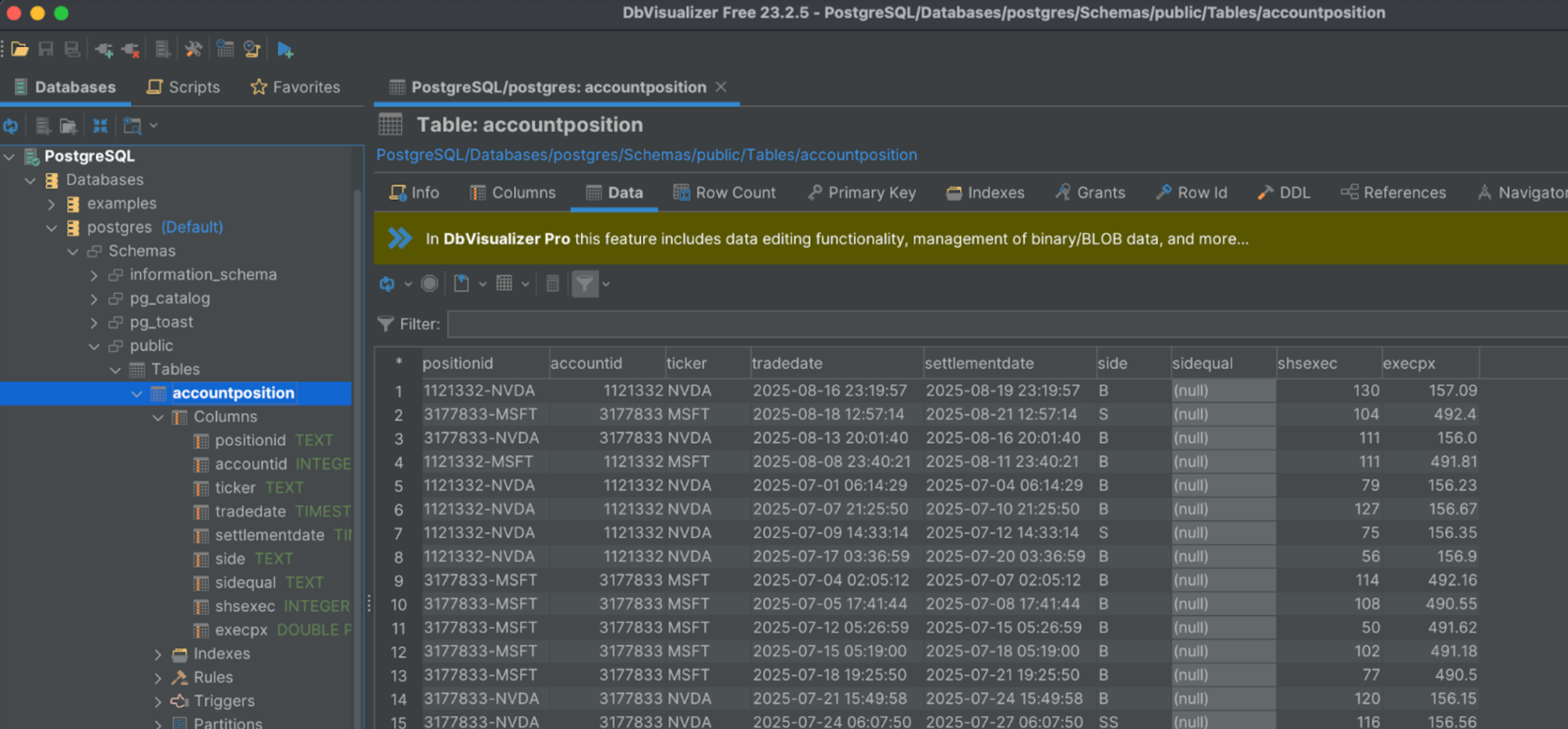
This makes it easier than ever to preserve the benefits of event sourcing at the core, while keeping relational views in sync with your event streams, and building powerful reports and analytics from your events
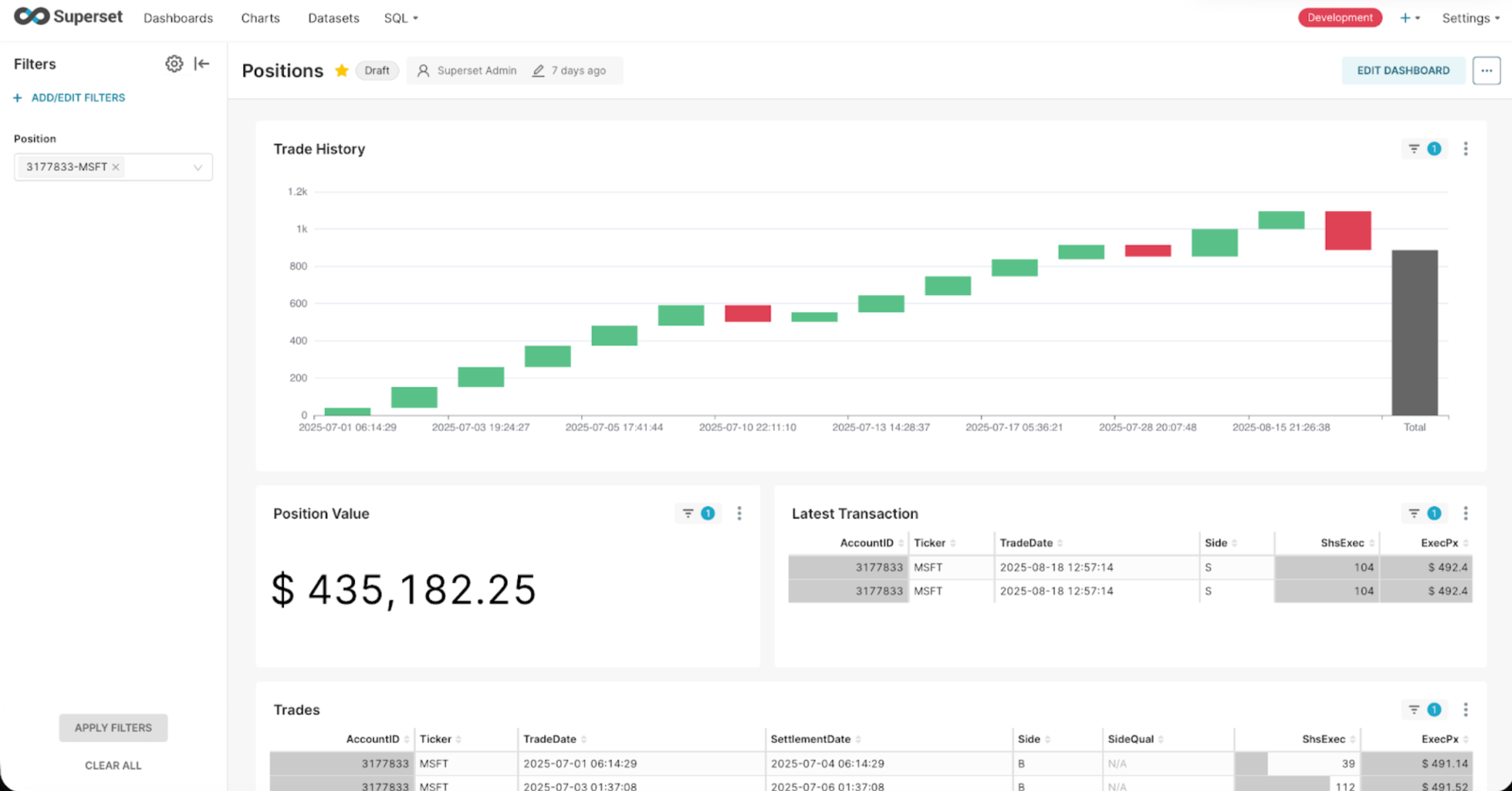 Learn more in our documentation
Partnering with Redpanda: Durability, Fine-Grained Streams, End-to-End Integration
We’re also excited to announce our partnership with Redpanda as part of the KurrentDB v26.0 release! Redpanda delivers Kafka-compatible streaming with exceptional performance, low complexity, and high operational efficiency. Together, KurrentDB and Redpanda form a powerful combination for teams building real-time, event-driven systems.
Better together: Kurrent + Redpanda
Our new Kafka Source and existing Kafka Sink connectors enable direct integration between Redpanda and KurrentDB, unlocking a true bi-directional flow of events:
- Stream events from Redpanda into KurrentDB: customers benefit from immutable, durable event storage, guaranteed ordering, easy replay, and rich domain modeling
- Stream events from KurrentDB into Redpanda for fan-out, real-time processing, and downstream consumption
- Achieve the benefits of fine-grained streams for entity modeling where your organization needs it
Getting started with Redpanda is very simple as it is a drop-in replacement for Kafka (including Confluent.) Simplify your multi-component Kafka deployment with a lightweight, single-service (i.e. single binary) Redpanda Docker definition like this:
  redpanda:
    image: docker.redpanda.com/redpandadata/redpanda:v25.3.2
    command:
      - redpanda start
      - --kafka-addr internal://0.0.0.0:9092,external://0.0.0.0:29092
      - --advertise-kafka-addr internal://redpanda:9092,external://host.docker.internal:29092
      - --pandaproxy-addr internal://0.0.0.0:8082,external://0.0.0.0:18082
      - --advertise-pandaproxy-addr internal://redpanda:8082,external://host.docker.internal:18082
      - --schema-registry-addr internal://0.0.0.0:8081,external://0.0.0.0:18081
      - --rpc-addr redpanda:33145
      - --advertise-rpc-addr redpanda:33145
      - --mode dev-container
      - --smp 1
    ports:
      - 18081:18081
      - 18082:18082
      - 29092:29092
      - 19644:9644
    volumes:
      - ~/Documents/redpanda:/var/lib/redpanda/data
    container_name: kafka
    hostname: kafka
    networks:
      singlenetwork:
        ipv4_address: 172.30.240.13
    healthcheck:
      test: ["CMD-SHELL", "rpk cluster health | grep -E 'Healthy:.+true' || exit 1"]
      interval: 15s
      timeout: 3s
      retries: 5
      start_period: 5s
This integration allows each platform to do what it does best:
- Redpanda excels at high-throughput, real-time streaming and distribution
- KurrentDB provides immutable, durable, ordered, and replayable event storage with strong consistency and rich domain semantics
The result is a simpler architecture with fewer moving parts - and far less custom code
Less Code, Less Complexity, Faster Delivery
By eliminating the need for bespoke Kafka-esque consumers, hand-rolled user projections, and custom integration services, teams can focus on delivering business value instead of infrastructure. Across all these new capabilities, the theme of KurrentDB v26.0 is clear:
- Configuration over custom code
- Reduced integration time
- Lower operational complexity
- Cleaner, more maintainable, architectures
- Kurrent and Redpanda: better together for modern, high-throughput, low-complexity, event-driven systems
User-Defined Indexes
Users can now define custom secondary indexes from record content for fast, field-based reads, subscriptions. The index follow the log and store their data separately on each node, so you get targeted access without increasing the log size.
Here is an example index definition that creates an index on the “country” field for events of type “OrderCreated”:
{
  "filter": "rec => rec.schema.name == 'OrderCreated'",
  "fields": [{
    "name": "country",
      "selector": "rec => rec.value.country",
      "type": "INDEX_FIELD_TYPE_STRING"
    }]
}
For more information on user-defined indexes, see the documentation.
Get Started with KurrentDB v26.0
KurrentDB v26.0 makes it easier than ever to connect your immutable, durable, globally ordered event streams to the rest of your data ecosystem - and our partnership with Redpanda ensures those streams are fast, scalable, and reliable from end to end. Have your product license handy - or request a trial license today - to unlock the new Kafka Source and Relational Sink connectors. You can try them with a Docker service such as the following:
kurrentdb:
   image: docker.cloudsmith.io/eventstore/kurrent-latest/kurrentdb:26.0.0
   container_name: kurrentdb
   hostname: kurrentdb
   healthcheck:
     test:
       [
         'CMD-SHELL',
         'curl --fail -k https://kurrentdb:2113/gossip || exit 1',
       ]
     interval: 5s
     timeout: 5s
     retries: 24
   environment:
     - KURRENTDB_LICENSING__LICENSE_KEY=<YOUR LICENSE KEY HERE>
     - KURRENTDB_USER_CERTIFICATES__ENABLED=false
     - KURRENTDB_TRUSTED_ROOT_CERTIFICATES_PATH=/certs/ca
     - KURRENTDB_CERTIFICATE_FILE=/certs/node1/node.crt
     - KURRENTDB_CERTIFICATE_PRIVATE_KEY_FILE=/certs/node1/node.key
     - KURRENTDB_RUN_PROJECTIONS=All
     - KURRENTDB_START_STANDARD_PROJECTIONS=true
     - KURRENTDB_SECONDARYINDEXING__ENABLED=true
     - KURRENTDB_ENABLE_ATOM_PUB_OVER_HTTP=true
     - KURRENTDB_CONNECTORS__DATAPROTECTION__TOKEN="<YOUR DATA PROTECTION TOKEN HERE>"
     - KURRENTDB_AUTHORIZATION__DEFAULT_POLICY_TYPE=streampolicy
   ports:
     - 2113:2113
     - 1113:1113
   volumes:
     - ~/Documents/esdb-certs:/certs
     - ~/Documents/esdb-1node_logs:/var/log/kurrentdb
     - ~/Documents/esdb-1node_data:/var/lib/kurrentdb
   networks:
     singlenetwork:
       ipv4_address: 172.30.240.11
You’ll need to modify this service definition to point to your own generated certificates, with your license key, and your data protection token
If you’re already using Kafka or Redpanda, or projecting events into Postgres or SQL Server, now is the time to simplify your architecture and move faster with KurrentDB!
